What not-so-scary books can you think of that would be good candidates for spookification? (Runaway Bunny, I'm looking at you...)
Showing posts with label Outreach. Show all posts
Jan 14, 2020
Scary, Not Scary
Do the kids that you read to love scary stories? Hate them? I meant to create this blog post around Halloween last year, but I didn't get around to it until now and so I'm posting it now before I forget. Scary stories don't just have to be for Halloween!
Dec 15, 2016
WonderWorks on the Road: Ramps
A very portable, take-along project, perfect for preschoolers!
Today's Topic: Ramps
Supplies:
cove molding (See details here)
balls
blocks (from the classroom's own collection)
Book:
Two little chicks / Gorbachev, Valeri
(older version of this book are titled "Chicken Chickens")
Today's Topic: Ramps
Supplies:
cove molding (See details here)
balls
blocks (from the classroom's own collection)
Book:
(older version of this book are titled "Chicken Chickens")
Feb 5, 2016
Apps that challenge users to create an invention or pose for a crazy picture
Taking tablets on my outreach visits continues to be popular with the participants! (Though they don't always trust that the apps I introduce will be any fun. Until they've played them.)
A few apps I tried last fall with the group:
Pettson's Inventions (no photos of this visit, sorry!)
Inventioneers
Image Scrimmage
The first two apps are invention-building apps and are good to do in the order listed. Pettson's Inventions solutions have one right answer whereas Inventioneers can be solved in multiple ways. Both are by the same app developer (Filimundus) and so they have a similar feel, but I like them both for different reasons. The kids seemed to really engage with these apps and did a nice job of working together to problem-solve each challenge. No one finished all of the free portions before the end of my visit, but a few came close.
Image Scrimmage is a photo treasure hunt with physical challenges. I did this one in December right before Winter Break and it was a great way to channel all of the wiggly energy of the group that day!
A few apps I tried last fall with the group:
Pettson's Inventions (no photos of this visit, sorry!)
Inventioneers
Image Scrimmage
The first two apps are invention-building apps and are good to do in the order listed. Pettson's Inventions solutions have one right answer whereas Inventioneers can be solved in multiple ways. Both are by the same app developer (Filimundus) and so they have a similar feel, but I like them both for different reasons. The kids seemed to really engage with these apps and did a nice job of working together to problem-solve each challenge. No one finished all of the free portions before the end of my visit, but a few came close.
Image Scrimmage is a photo treasure hunt with physical challenges. I did this one in December right before Winter Break and it was a great way to channel all of the wiggly energy of the group that day!
For our winter series, I'm going to be trying out a series of comic-creation apps. Stay tuned for more app-ventures!
Jan 14, 2016
WonderWorks Outreach: playdough + blocks
Wait.... didn't we just do this project?
Today's Topic: Blocks + Playdough, outreach edition!
Supplies:
wooden blocks
playdough
Book:
The three little wolves and the big bad pig / Trivizas, Eugenios
Flannel board:
Los Tres Cerditos by Ana Lomba (scroll down to find a recording) using this piggie pattern
Today's Topic: Blocks + Playdough, outreach edition!
Supplies:
wooden blocks
playdough
Book:
Flannel board:
Los Tres Cerditos by Ana Lomba (scroll down to find a recording) using this piggie pattern
Dec 17, 2015
WonderWorks: Magnets (outreach edition)
What do magnets stick to?
Supplies:
variety of large, non-choking hazard magnets
iron filing cases
a tub full of a mix of things that would stick to a magnet and things that won't stick
small objects in plastic jars with lids (some metallic)
Stuck / Jeffers, Oliver
(while not strictly about magnetism, this book is way more fun to read than any book about magnets and hey, magnets get stuck on things so....)
What we sang:
Icky Sticky Sticky Sticky Bubblegum Song
Supplies:
variety of large, non-choking hazard magnets
iron filing cases
a tub full of a mix of things that would stick to a magnet and things that won't stick
small objects in plastic jars with lids (some metallic)
What we read:
(while not strictly about magnetism, this book is way more fun to read than any book about magnets and hey, magnets get stuck on things so....)
What we sang:
Icky Sticky Sticky Sticky Bubblegum Song
Nov 11, 2015
WonderWorks: Tweezer & Tongs (outreach edition)
Fine motor skills, sorting, and technology (tools) -- this STEM lesson has it all!
Today's Project: Tweezers & Tongs (outreach edition)
Supplies:
tweezers
salad tongs (medium and large size)
pom-poms (teeny and average size)
feathers
cotton balls
wiffle balls
buckets
egg cartons
Books:
How to catch an elephant / Schwartz, Amy
This is such a strange little storyline, but it's got some great interactive elements if you play them up. The kids loved this one!
Chopsticks / Rosenthal, Amy Krouse
Today's Project: Tweezers & Tongs (outreach edition)
Supplies:
tweezers
salad tongs (medium and large size)
pom-poms (teeny and average size)
feathers
cotton balls
wiffle balls
buckets
egg cartons
Books:
This is such a strange little storyline, but it's got some great interactive elements if you play them up. The kids loved this one!
Nov 3, 2015
Summer Special: Content Creation Apps for School Age kids
With a little advance planning, apps can bring kids together for collaborative, creative fun.
This summer, I made a few visits to our local community center where I worked with a great group of kids using some apps I loaded onto iPads that I brought along. The kids seemed to enjoy all three apps that we used, so I thought I'd share them here. I visited the community center three times with iPads and we used a different app during each visit.
The first app that we worked with was YakIt! for Kids. I was inspired by my friend and colleague, Anne Hicks and brought in some books and magazines with big faces on the cover. I encouraged the kids to take a picture of the cover and then use the app to add crazy eyes, mouth, and more to the picture and then record themselves speaking. As they spoke, the mouths they'd added to their photo moved to give the impression that the photos were talking. The kids had fun with this and didn't take long to realize that they could also photograph their friends and teachers and add silly things to those photos.
During the second week, I introduced Toontastic. This is a fantastic and powerful app that is a great introduction to animation and the concept of creating a story arc. You can use their pre-made backgrounds, people and props or you can design your own! We barely scratched the surface of what this app can do in the one hour I was there. During subsequent visits, someone almost always asks if they can just use Toontastic again once they've played with whatever my featured app is. Toontastic could easily have been used for the entire three week session!
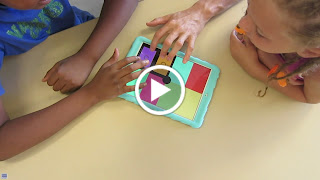
For the third week, we used the app Keezy. This is the simplest sound-mixing board I've ever used and there are so many great ways to use this app. The kids in this class had already been using their hands to create rhythms, so I knew they'd enjoy the opportunity to create a whole mix of music. Basically, there are 8 colored squares and you can use the pre-recorded sounds or make your own sound board and mix it however you want to.
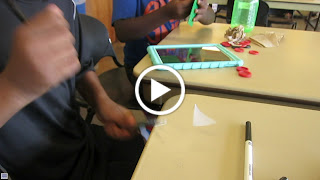
I especially enjoyed the ingenuity of these two guys who searched their classroom to find different things they could use as "instruments."
I think this app would be a fun way to create soundtracks to use in the movie-making activities that go on at my library! All of these apps were free to download and use. I'm looking forward to trying more apps with this group over the course of the school year.
This summer, I made a few visits to our local community center where I worked with a great group of kids using some apps I loaded onto iPads that I brought along. The kids seemed to enjoy all three apps that we used, so I thought I'd share them here. I visited the community center three times with iPads and we used a different app during each visit.
The first app that we worked with was YakIt! for Kids. I was inspired by my friend and colleague, Anne Hicks and brought in some books and magazines with big faces on the cover. I encouraged the kids to take a picture of the cover and then use the app to add crazy eyes, mouth, and more to the picture and then record themselves speaking. As they spoke, the mouths they'd added to their photo moved to give the impression that the photos were talking. The kids had fun with this and didn't take long to realize that they could also photograph their friends and teachers and add silly things to those photos.
During the second week, I introduced Toontastic. This is a fantastic and powerful app that is a great introduction to animation and the concept of creating a story arc. You can use their pre-made backgrounds, people and props or you can design your own! We barely scratched the surface of what this app can do in the one hour I was there. During subsequent visits, someone almost always asks if they can just use Toontastic again once they've played with whatever my featured app is. Toontastic could easily have been used for the entire three week session!
For the third week, we used the app Keezy. This is the simplest sound-mixing board I've ever used and there are so many great ways to use this app. The kids in this class had already been using their hands to create rhythms, so I knew they'd enjoy the opportunity to create a whole mix of music. Basically, there are 8 colored squares and you can use the pre-recorded sounds or make your own sound board and mix it however you want to.
I especially enjoyed the ingenuity of these two guys who searched their classroom to find different things they could use as "instruments."
I think this app would be a fun way to create soundtracks to use in the movie-making activities that go on at my library! All of these apps were free to download and use. I'm looking forward to trying more apps with this group over the course of the school year.
Oct 17, 2015
WonderWorks on the Road: Geoboards
Today's Topic: Shapes
Supplies:
Geoboards
Rubber bands
Book:
Subscribe to:
Posts (Atom)